
ROI Calculator

Overview

We (my manager and I) worked with our client, Minoa, B2B Saas start-up serving salespeople, in a 2 week sprint to redesign their ROI Calculator, a tool to help salespeople more quickly and easily arrive at value propositions within their business cases.​

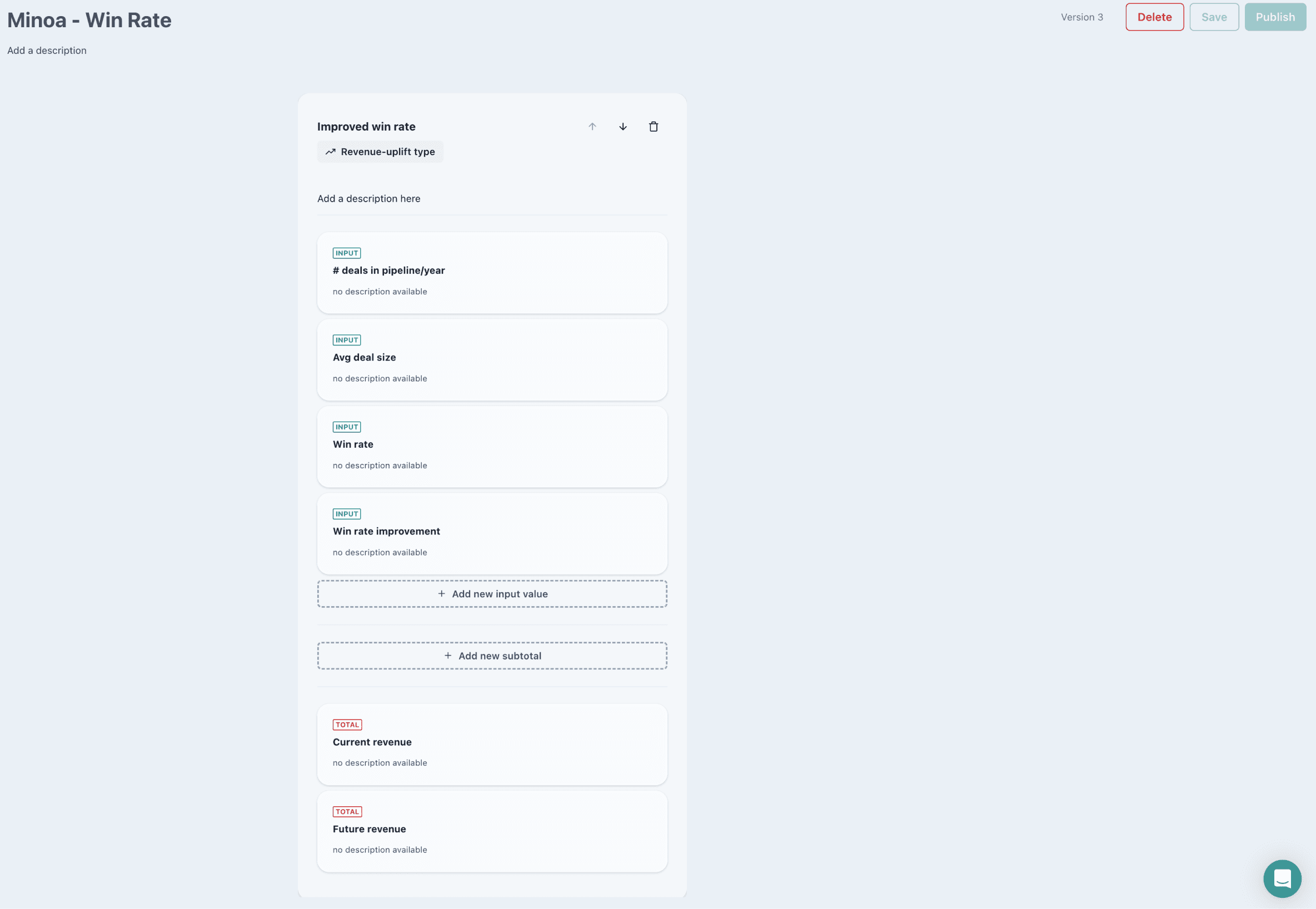
The overarching goal of this sprint was to increase the number of business cases created. In uncovering barriers to users creating business cases, we identified the ROI calculator as a major sticking point. Its block layout was not intuitive for users who are used to representing equations horizontally. Its interface did not support exploration, and overall it was difficult to quickly edit calculations.

Our new calculator featured:
Formula Bar

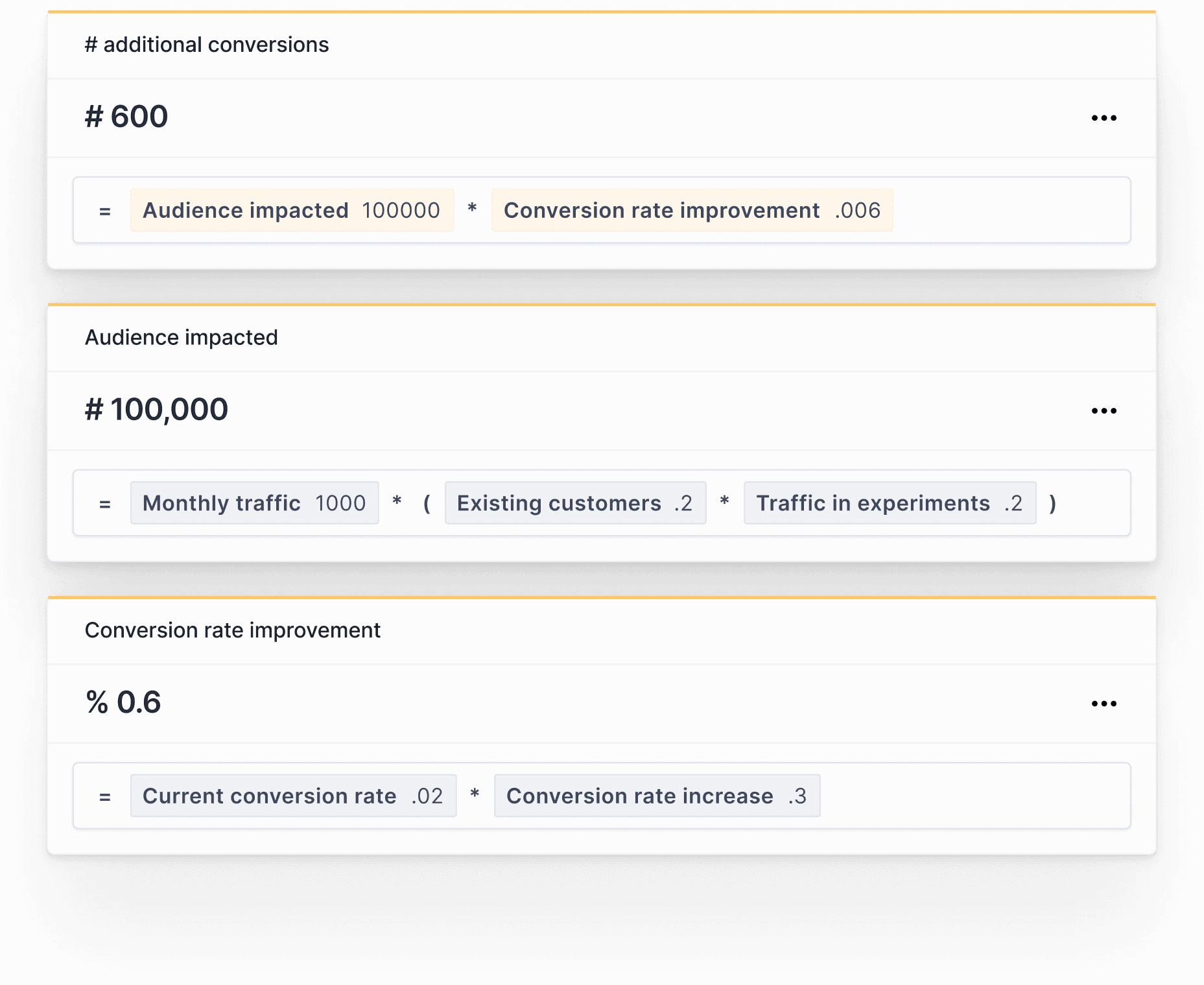
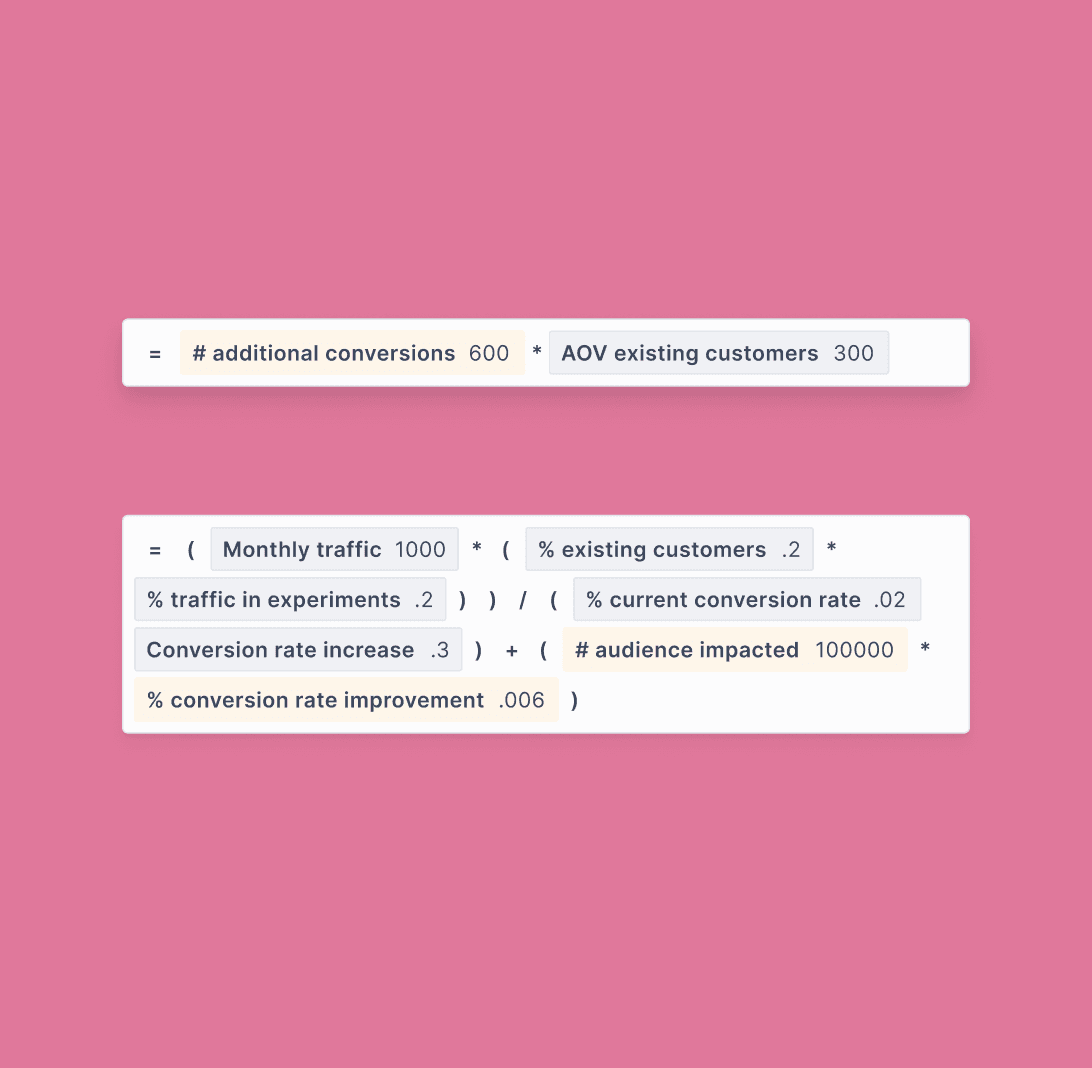
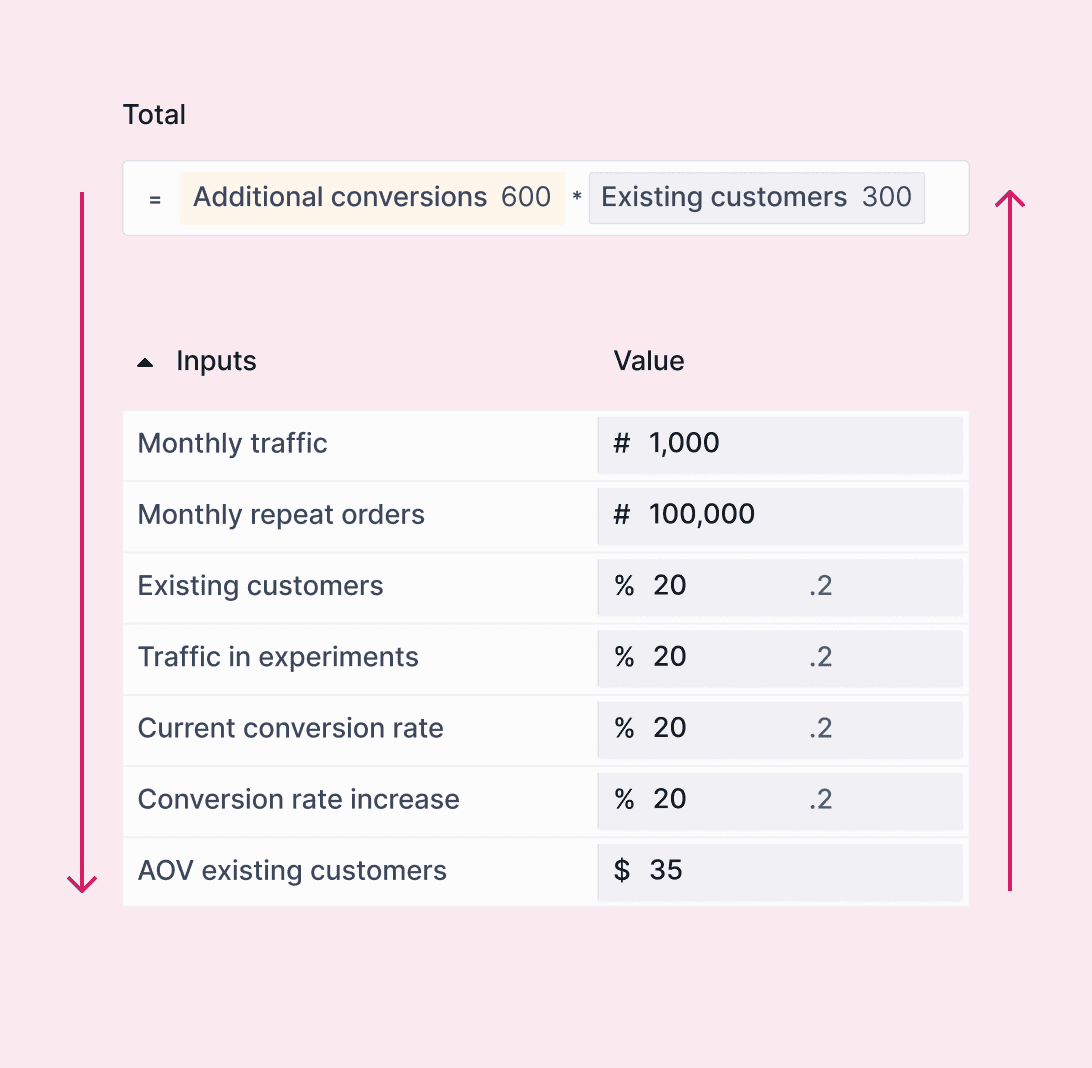
Build calculations horizontally in a formula bar. Enter operators, search and select inputs and subcalculations in the formula bar.
Formula Bar

Build calculations horizontally in a formula bar. Enter operators, search and select inputs and subcalculations in the formula bar.

Formula Bar

Build calculations horizontally in a formula bar. Enter operators, search and select inputs and subcalculations in the formula bar.

Top Down/Bottom Up Workflows

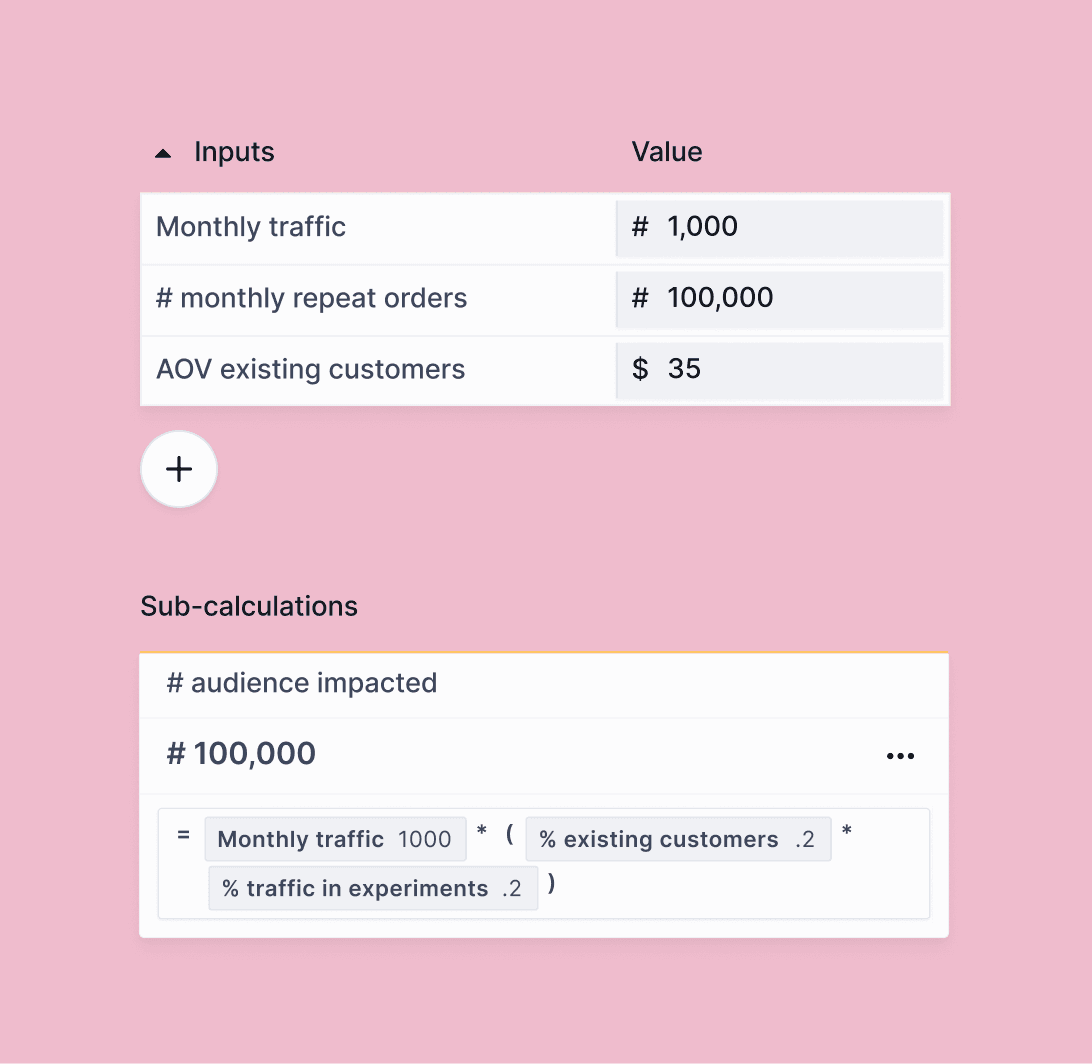
Users with diverse workflows are supported in the new design, whether they start with configuring inputs, or the formula.
Top Down/Bottom Up Workflows

Users with diverse workflows are supported in the new design, whether they start with configuring inputs, or the formula.

Top Down/Bottom Up Workflows

Users with diverse workflows are supported in the new design, whether they start with configuring inputs, or the formula.

Increased visibility and usability

Easily see, add and edit inputs, subtotals and formula bar outputs, all at once.

Increased visibility and usability

Easily see, add and edit inputs, subtotals and formula bar outputs, all at once.

Increased visibility and usability

Easily see, add and edit inputs, subtotals and formula bar outputs, all at once.

Explore, tinker and play

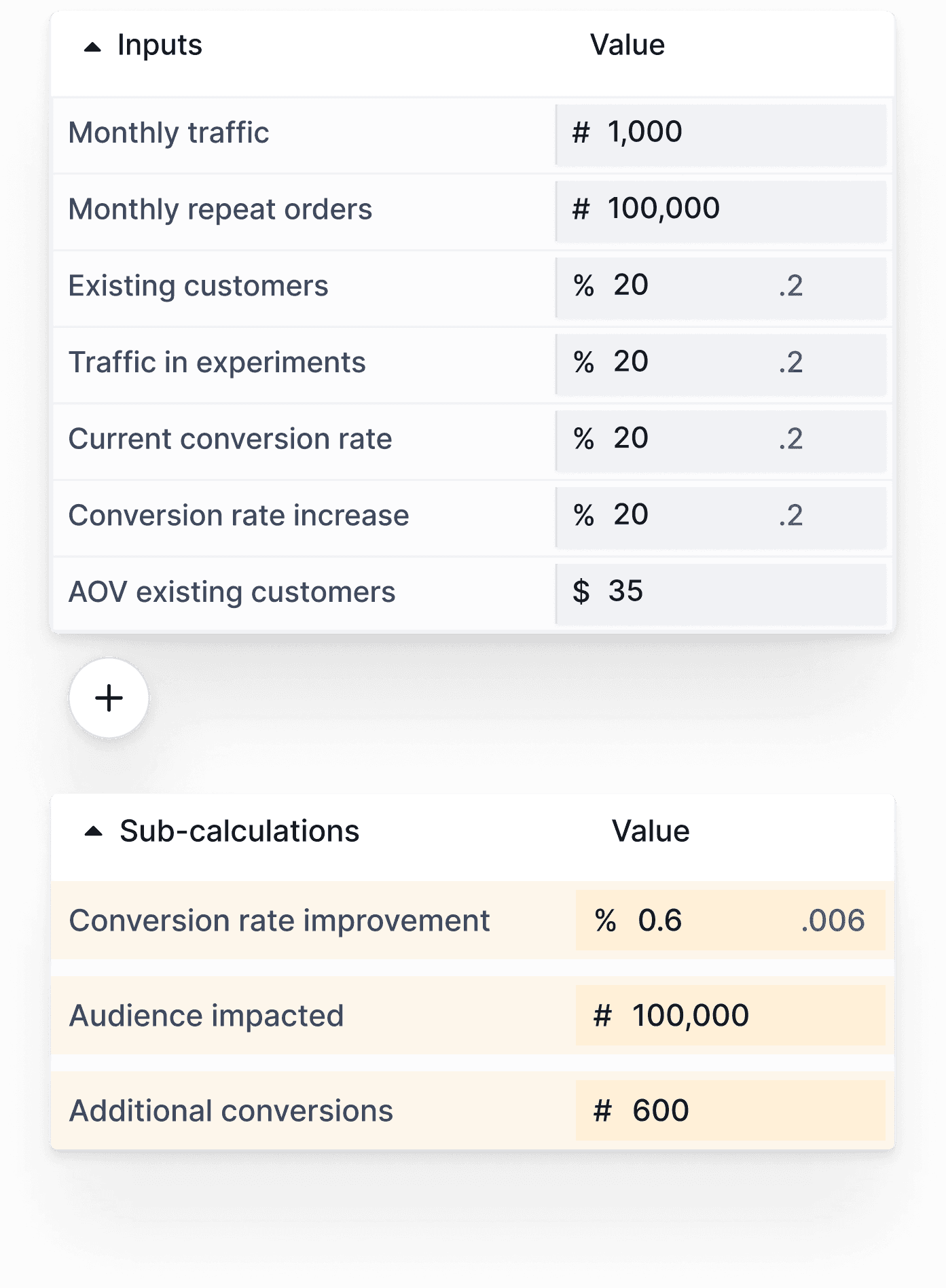
Duplicate calculations and revert to old versions, edit inputs in a spreadsheet-inspired UI and see the overall output change.

Explore, tinker and play

Duplicate calculations and revert to old versions, edit inputs in a spreadsheet-inspired UI and see the overall output change.

Explore, tinker and play

Duplicate calculations and revert to old versions, edit inputs in a spreadsheet-inspired UI and see the overall output change.

Client Background

Minoa is a value intelligence platform that helps B2B sales teams create collaborative business cases: turning complex ROI spreadsheets into clean, shareable documents that sellers co-create with their prospects.

The ROI Calculator helps salespeople make a financial case for what they're selling, using current and projected numbers to illustrate how their product will either reduce costs or improve revenue.

Requirements

Maintain existing system and functionality

There were a ton of existing business cases already in flight, we needed to make sure they wouldn't break when introducing our design. All existing functionality would need to be accounted for and mapped onto our new work.

Maintain existing system and functionality

There were a ton of existing business cases already in flight, we needed to make sure they wouldn't break when introducing our design. All existing functionality would need to be accounted for and mapped onto our new work.

Maintain existing system and functionality

There were a ton of existing business cases already in flight, we needed to make sure they wouldn't break when introducing our design. All existing functionality would need to be accounted for and mapped onto our new work.

Informal exploration and play

Without Minoa, this ROI calculation work is typically done in spreadsheets. There is an element of play and exploration users can easily do in spreadsheets, and it was important to allow for this kind of tinkering.

Informal exploration and play

Without Minoa, this ROI calculation work is typically done in spreadsheets. There is an element of play and exploration users can easily do in spreadsheets, and it was important to allow for this kind of tinkering.

Informal exploration and play

Without Minoa, this ROI calculation work is typically done in spreadsheets. There is an element of play and exploration users can easily do in spreadsheets, and it was important to allow for this kind of tinkering.

Accommodate varied working styles

Some salespeople work from inputs to outputs, configuring all the input information, then configuring the formulas that build on them - bottom-up workflows. Some salespeople begin working from their output formula, and as theyre building this, they start to compile the list of inputs they will need to track down - top-down workflows.

Accommodate varied working styles

Some salespeople work from inputs to outputs, configuring all the input information, then configuring the formulas that build on them - bottom-up workflows. Some salespeople begin working from their output formula, and as theyre building this, they start to compile the list of inputs they will need to track down - top-down workflows.

Accommodate varied working styles

Some salespeople work from inputs to outputs, configuring all the input information, then configuring the formulas that build on them - bottom-up workflows. Some salespeople begin working from their output formula, and as theyre building this, they start to compile the list of inputs they will need to track down - top-down workflows.

Research

Existing Solution Audit

I did an audit of our existing solution to identify areas for improvement. I also took a look at competitors (direct and indirect) to see how other products are solving complex calculator and coding challenges.

1

2

3

1

2

3

1

2

3

1

Information is organized vertically in blocks

Information is organized vertically in blocks

1

Information is organized vertically in blocks

2

On default there is a ton of empty space

On default there is a ton of empty space

2

On default there is a ton of empty space

3

Several instances of duplicative, unhelpful text

Several instances of duplicative, unhelpful text

3

Several instances of duplicative, unhelpful text

Customer Interviews

We conducted two in-depth customer interviews to learn more about how they use the existing calculator: what they liked, didn't like, or wished they could do. The high level takeaways:

Where are my totals?

Both users expected to find their total/output called out, or a large calculated total number somewhere. One user suggested it would be nice to show the spatial relationship between inputs and outputs.

Where are my totals?

Both users expected to find their total/output called out, or a large calculated total number somewhere. One user suggested it would be nice to show the spatial relationship between inputs and outputs.

Where are my totals?

Both users expected to find their total/output called out, or a large calculated total number somewhere. One user suggested it would be nice to show the spatial relationship between inputs and outputs.

Problems configuring inputs

Neither user could figure out how to change the input type and were confused by the input detail panel. One user commented that it would be nice to easily see and use the ‘building blocks’ of the calculation.

Problems configuring inputs

Neither user could figure out how to change the input type and were confused by the input detail panel. One user commented that it would be nice to easily see and use the ‘building blocks’ of the calculation.

Problems configuring inputs

Neither user could figure out how to change the input type and were confused by the input detail panel. One user commented that it would be nice to easily see and use the ‘building blocks’ of the calculation.

Confusion with vertically stacking blocks

One user did not understand the concept of calculation blocks. They also commented that they expected drag and drop functionality. This expectation I attribute to the block interface itself.

Confusion with vertically stacking blocks

One user did not understand the concept of calculation blocks. They also commented that they expected drag and drop functionality. This expectation I attribute to the block interface itself.

Confusion with vertically stacking blocks

One user did not understand the concept of calculation blocks. They also commented that they expected drag and drop functionality. This expectation I attribute to the block interface itself.

Competitive Research

To better understand competitors’ calculation workspace user experiences, I researched Pry, Causal, and Scratch. I focused on the surfaces they used, their overall layouts, and the input interface. How do users configure input information in these applications? How do they see, add and edit inputs and outputs?

Pry - Model Page
Key Takeaways

Large centered workspace

Information is organized in a three column layout. Leftmost column is for managing low level inputs. The center area is the main "workspace." The rightjhand is for outputs.

Large centered workspace

Information is organized in a three column layout. Leftmost column is for managing low level inputs. The center area is the main "workspace." The rightjhand is for outputs.

Large centered workspace

Information is organized in a three column layout. Leftmost column is for managing low level inputs. The center area is the main "workspace." The rightjhand is for outputs.

Formula bar and horizontal work

A formula bar is where the main job of calculating takes place. The calculation is arranged horizontally, following the format of a formulas in spreadsheets.

Formula bar and horizontal work

A formula bar is where the main job of calculating takes place. The calculation is arranged horizontally, following the format of a formulas in spreadsheets.

Formula bar and horizontal work

A formula bar is where the main job of calculating takes place. The calculation is arranged horizontally, following the format of a formulas in spreadsheets.

Branching and duplication features

Affordances to easily branch and duplicate calculations into safe "sandboxes," allowing for experimentation and play.

Branching and duplication features

Affordances to easily branch and duplicate calculations into safe "sandboxes," allowing for experimentation and play.

Branching and duplication features

Affordances to easily branch and duplicate calculations into safe "sandboxes," allowing for experimentation and play.

Spreadsheet UI elements

These products all used spreadsheet visual language to indicate things like hierarchy, and how my eye should move across the page.

Spreadsheet UI elements

These products all used spreadsheet visual language to indicate things like hierarchy, and how my eye should move across the page.

Spreadsheet UI elements

These products all used spreadsheet visual language to indicate things like hierarchy, and how my eye should move across the page.

Design Solution

After my competitive research, aspects of our solution space seemed clearer. Keeping an eye on our requirement to accommodate current functionality, I started by figuring out how to translate an existing Minoa ROI calculation into a new interface based on my competitive comparison learnings, something with a large centered workspace, and formula bar.​

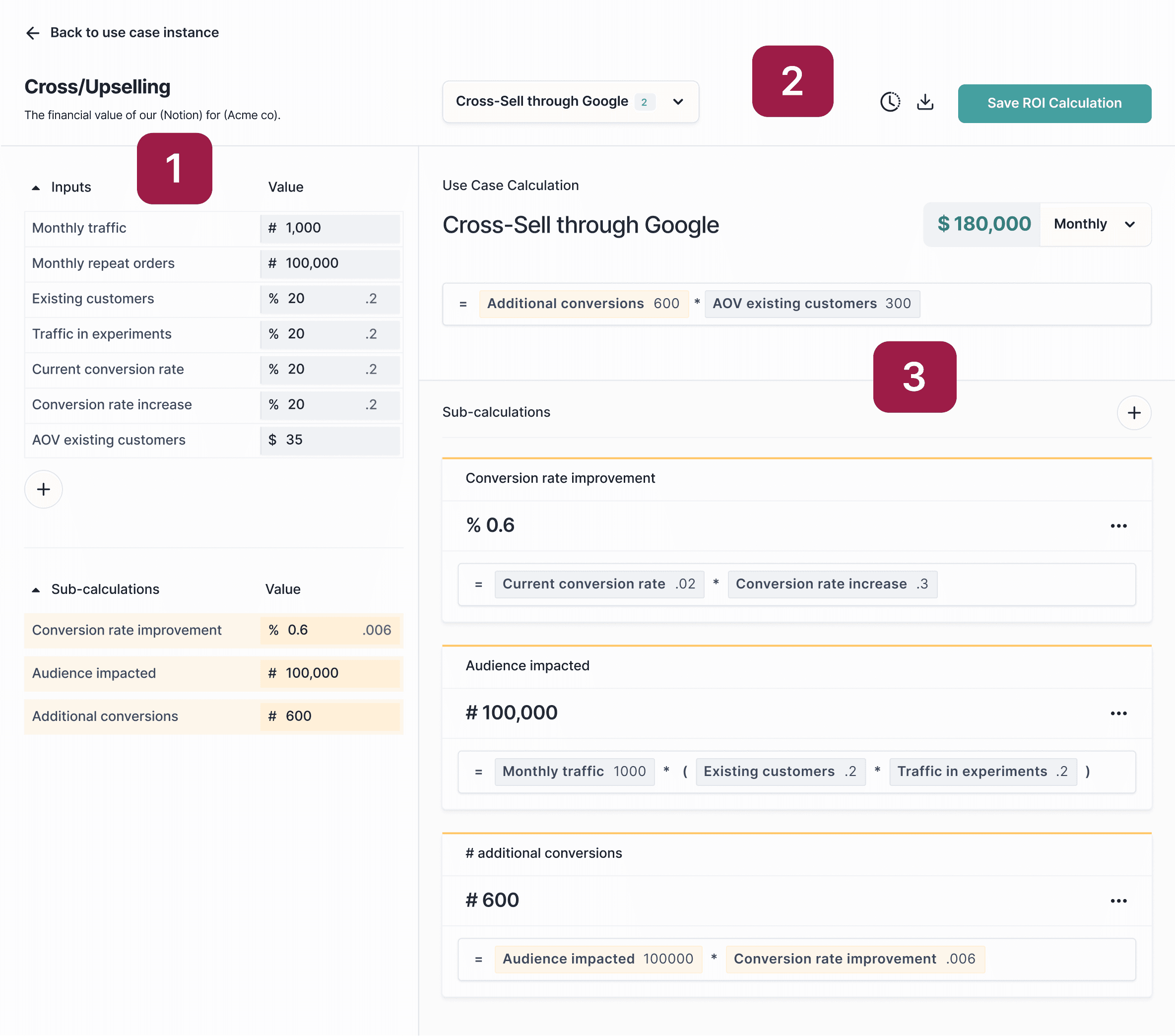
A couple of rounds of iteration and a UI skinning pass later, we arrived at our final design. Called out here are the major areas of change from initial wireframe to final, and why we made those decisions.

2

3

1

1

Spreadsheet UI for inputs

We replaced blocks with a spreadsheet UI for inputs. Users typically do calculator work in spreadsheets, so our solution is familiar and allows users to experiment to develop their calculations.

1

Spreadsheet UI for inputs

We replaced blocks with a spreadsheet UI for inputs. Users typically do calculator work in spreadsheets, so our solution is familiar and allows users to experiment to develop their calculations.

1

Spreadsheet UI for inputs

We replaced blocks with a spreadsheet UI for inputs. Users typically do calculator work in spreadsheets, so our solution is familiar and allows users to experiment to develop their calculations.

2

Duplication and versioning

Added support for multiple calculations, allowing for quick duplication and experimentation with different inputs. Included an affordance for versioning, users can now revert to older versions.

2

Duplication and versioning

Added support for multiple calculations, allowing for quick duplication and experimentation with different inputs. Included an affordance for versioning, users can now revert to older versions.

2

Duplication and versioning

Added support for multiple calculations, allowing for quick duplication and experimentation with different inputs. Included an affordance for versioning, users can now revert to older versions.

3

Formula bar

We tried allowing for both block and formula strategies in one design, but ruled it out because it was too confusing. Ultimately we committed to a horizontal formula bar approach across the board.

3

Formula bar

We tried allowing for both block and formula strategies in one design, but ruled it out because it was too confusing. Ultimately we committed to a horizontal formula bar approach across the board.

3

Formula bar

We tried allowing for both block and formula strategies in one design, but ruled it out because it was too confusing. Ultimately we committed to a horizontal formula bar approach across the board.