Session Insights

Overview

Serving as Design Lead on the Session Insights sprint for Minoa, I designed a feature to expose engagement information and activities occurring within a collaborative document. At a glance, this feature included:
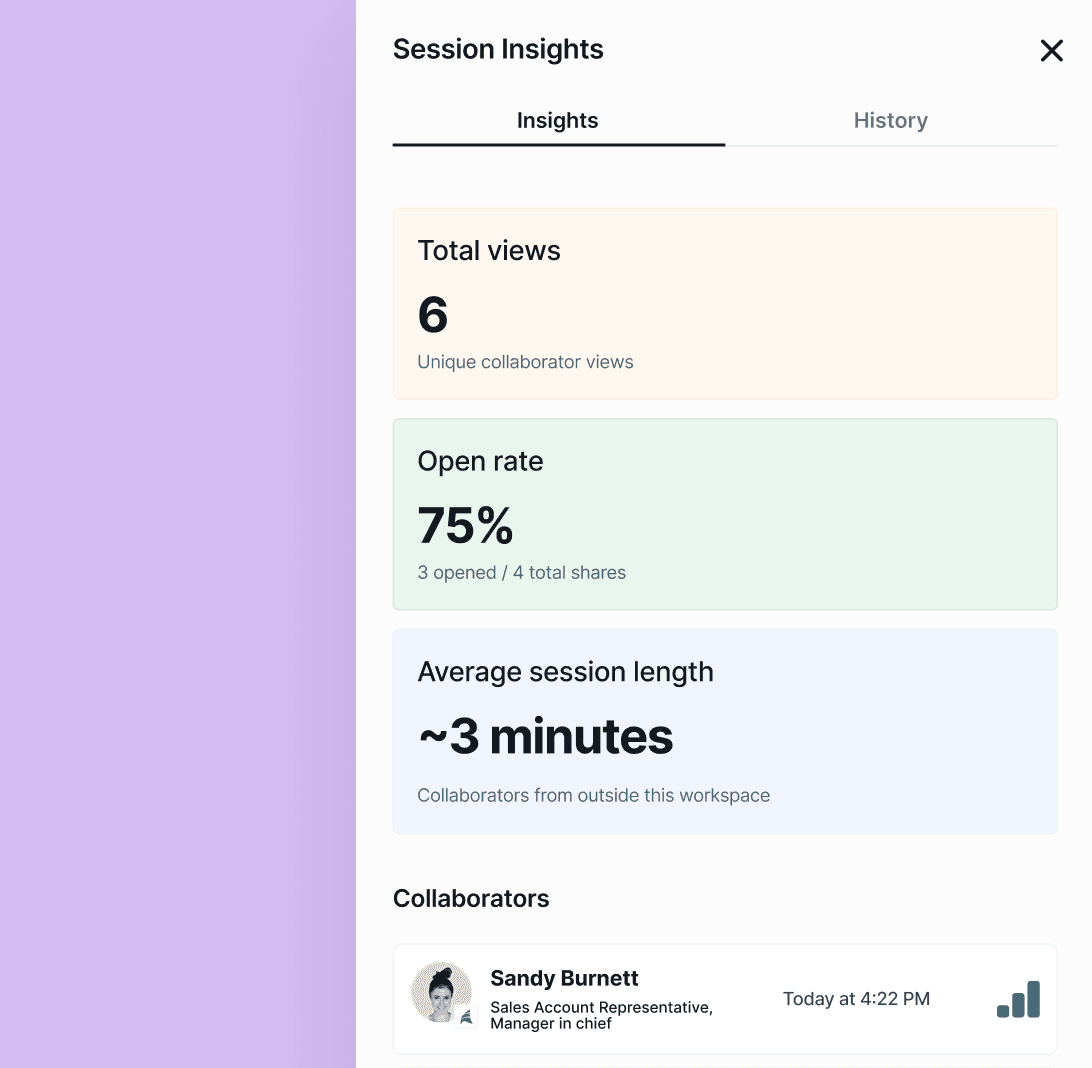
Insights Tab

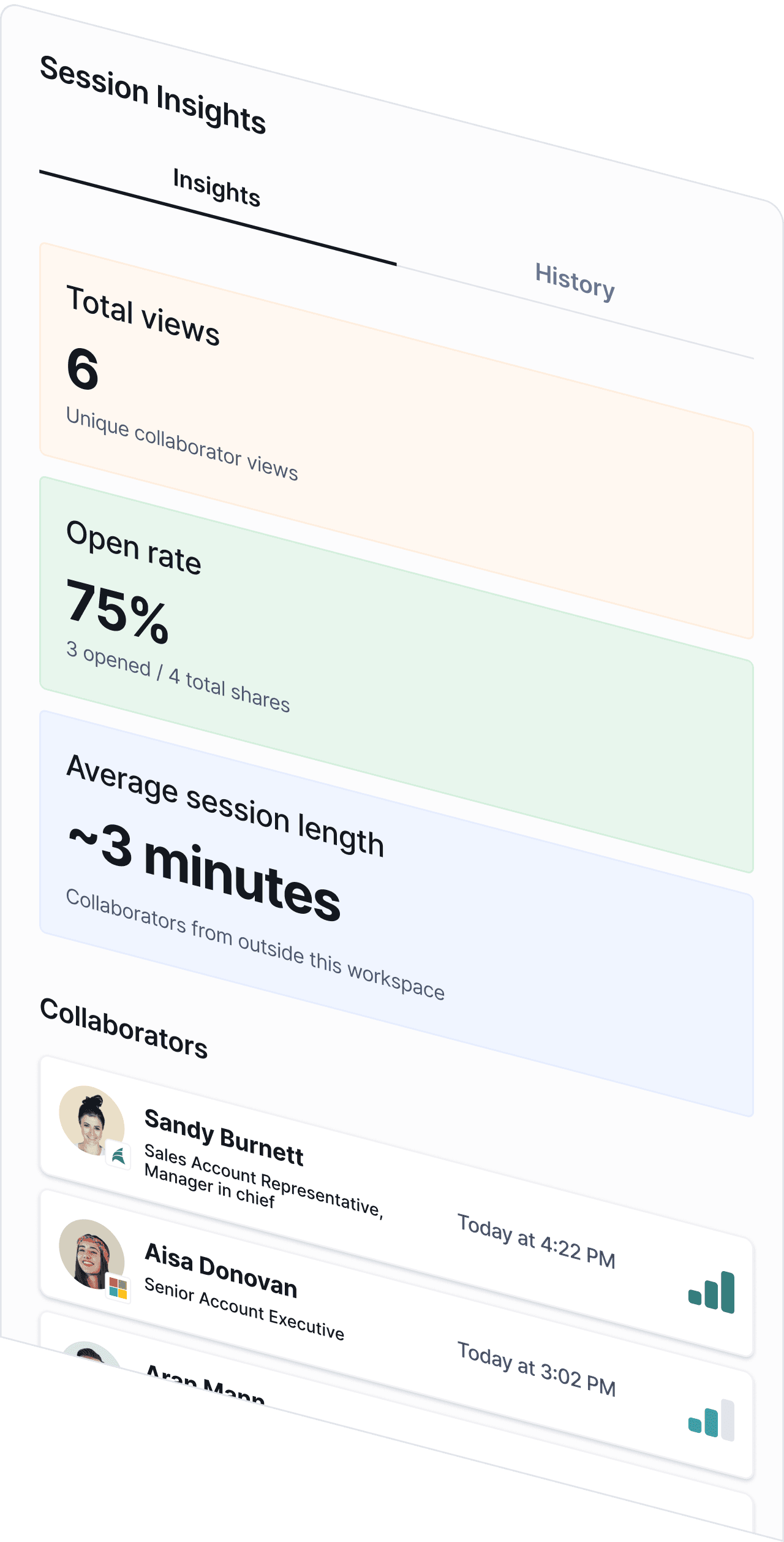
High level Engagement metrics surface deal health at a glance. Collaborator engagement score identifies stakeholder champions.
Insights Tab

High level Engagement metrics surface deal health at a glance. Collaborator engagement score identifies stakeholder champions.

Insights Tab

High level Engagement metrics surface deal health at a glance. Collaborator engagement score identifies stakeholder champions.

History Tab

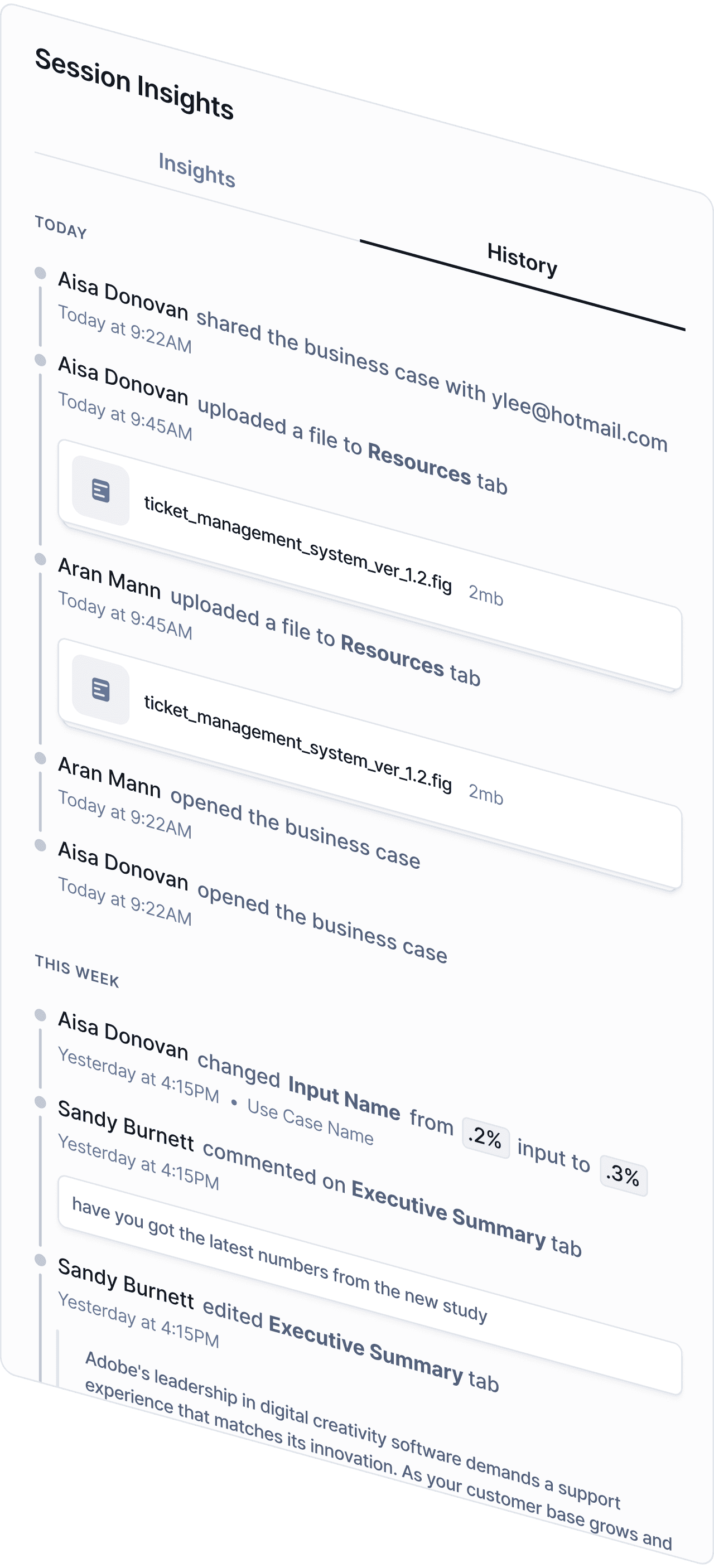
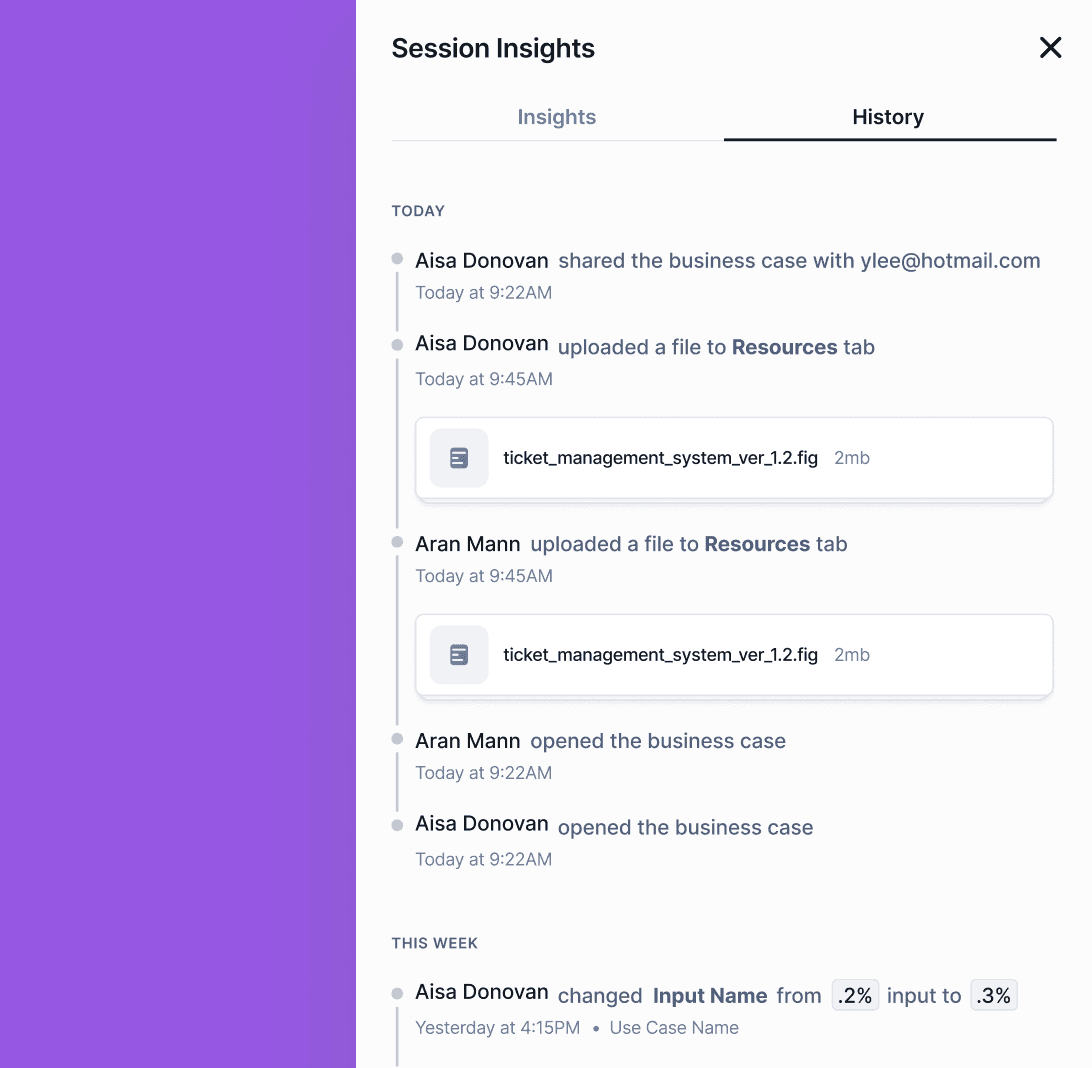
Granular activity log of interactions occurring in the document. Users get peace of mind without the engineering lift required for full versioning controls.
History Tab

Granular activity log of interactions occurring in the document. Users get peace of mind without the engineering lift required for full versioning controls.

History Tab

Granular activity log of interactions occurring in the document. Users get peace of mind without the engineering lift required for full versioning controls.

Visitor Details

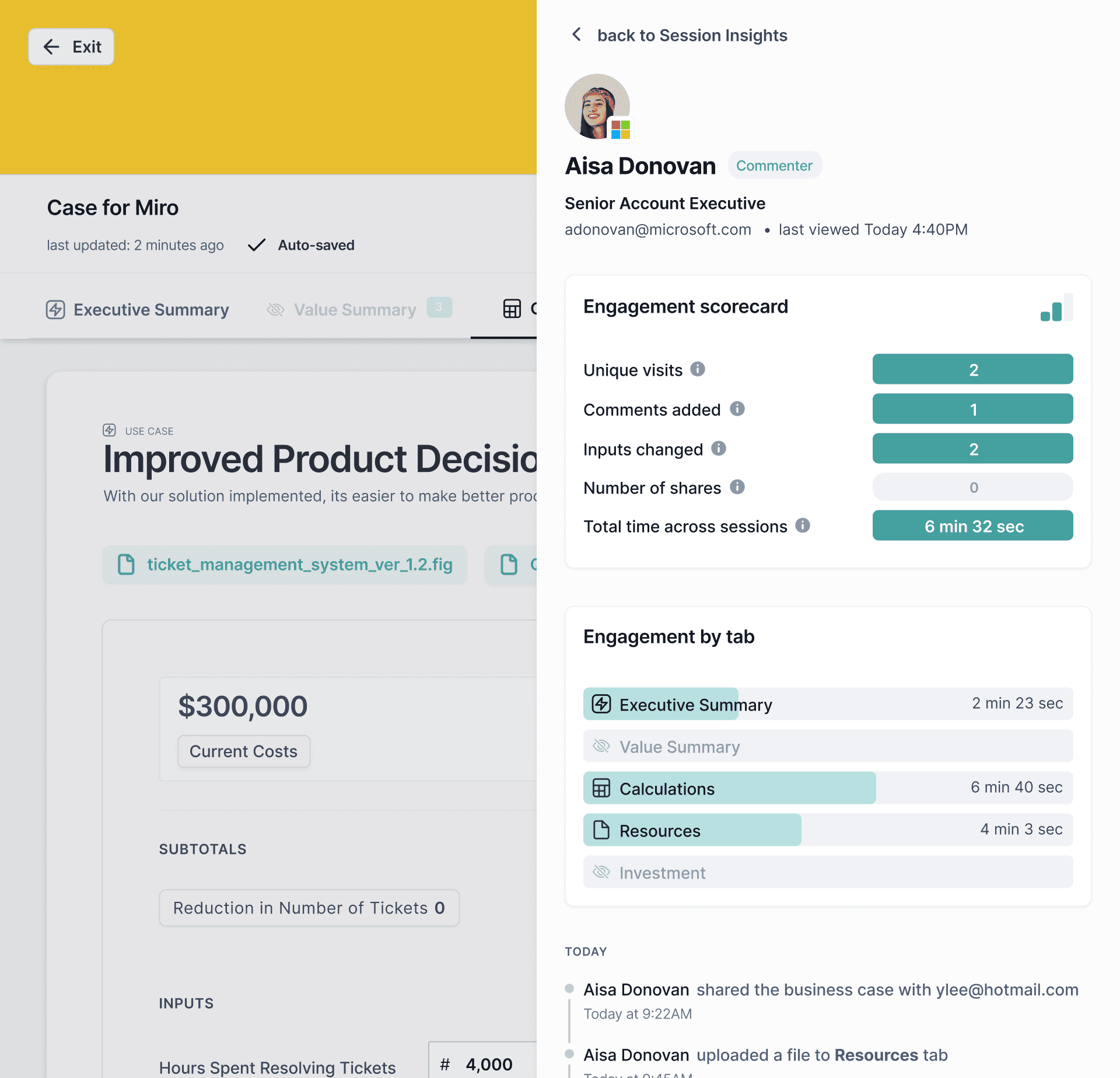
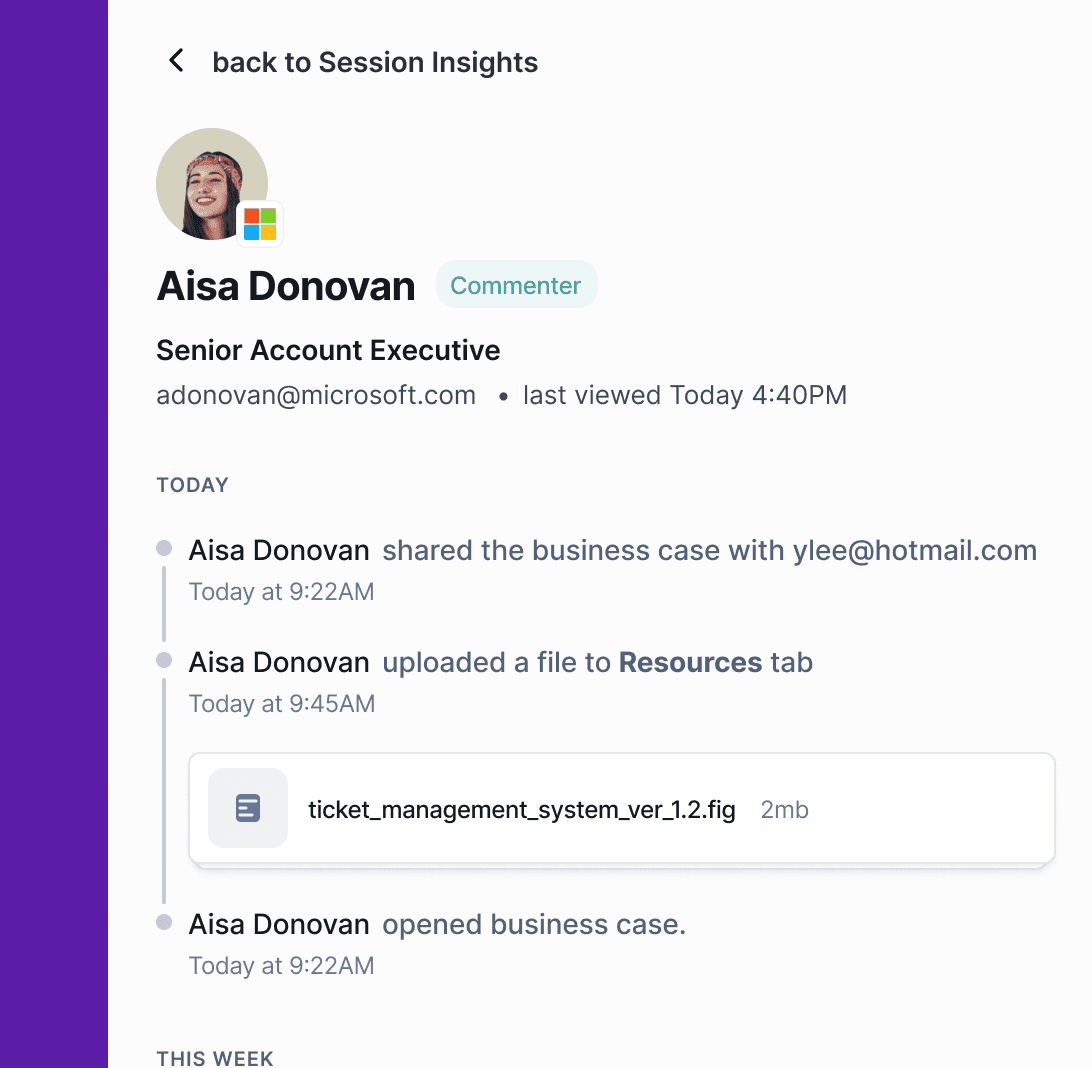
Individual engagement detail helps identify at-risk deals vs engaged champions. Document owners can see who changed what, when.
Visitor Details

Individual engagement detail helps identify at-risk deals vs engaged champions. Document owners can see who changed what, when.

Visitor Details

Individual engagement detail helps identify at-risk deals vs engaged champions. Document owners can see who changed what, when.

Engagement Scorecard

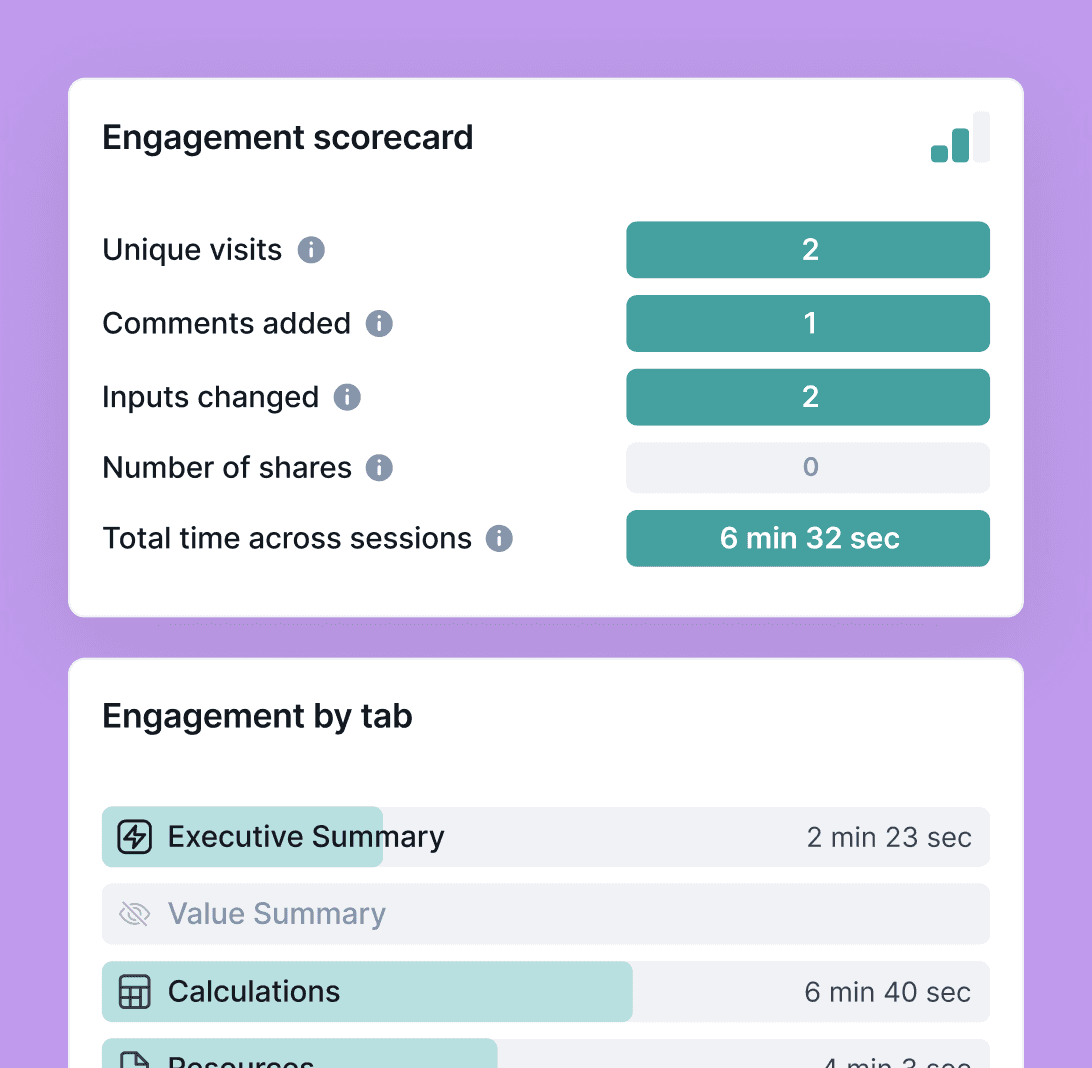
Snapshot of collaborators relative level of activity in the document. Users can identify high impact content and improve future business cases.

Engagement Scorecard

Snapshot of collaborators relative level of activity in the document. Users can identify high impact content and improve future business cases.

Engagement Scorecard

Snapshot of collaborators relative level of activity in the document. Users can identify high impact content and improve future business cases.

Client Background

Minoa is a value intelligence platform that helps B2B sales teams create collaborative business cases: turning complex ROI spreadsheets into clean, shareable documents that sellers co-create with their prospects. These business cases are living documents that prospects can interact with, not static PDFs.

The platform guides sellers through value selling by providing templated use cases, financial calculations, and AI-powered insights.

Requirements

Promote in-app sharing over exporting

We needed to incentivize in-app sharing rather than exporting.

Promote in-app sharing over exporting

We needed to incentivize in-app sharing rather than exporting.

Promote in-app sharing over exporting

We needed to incentivize in-app sharing rather than exporting.

Enhanced engagement visibility

Once exported, both Minoa and the sales team lose all engagement visibility.

Enhanced engagement visibility

Once exported, both Minoa and the sales team lose all engagement visibility.

Enhanced engagement visibility

Once exported, both Minoa and the sales team lose all engagement visibility.

Expose edit history

Sales teams needed to feel like they had control over the doc once it was shared.

Expose edit history

Sales teams needed to feel like they had control over the doc once it was shared.

Expose edit history

Sales teams needed to feel like they had control over the doc once it was shared.

Lightweight Solution

Full versioning controls were out of scope. We needed a lightweight edit history.

Lightweight Solution

Full versioning controls were out of scope. We needed a lightweight edit history.

Lightweight Solution

Full versioning controls were out of scope. We needed a lightweight edit history.

Competitive Research

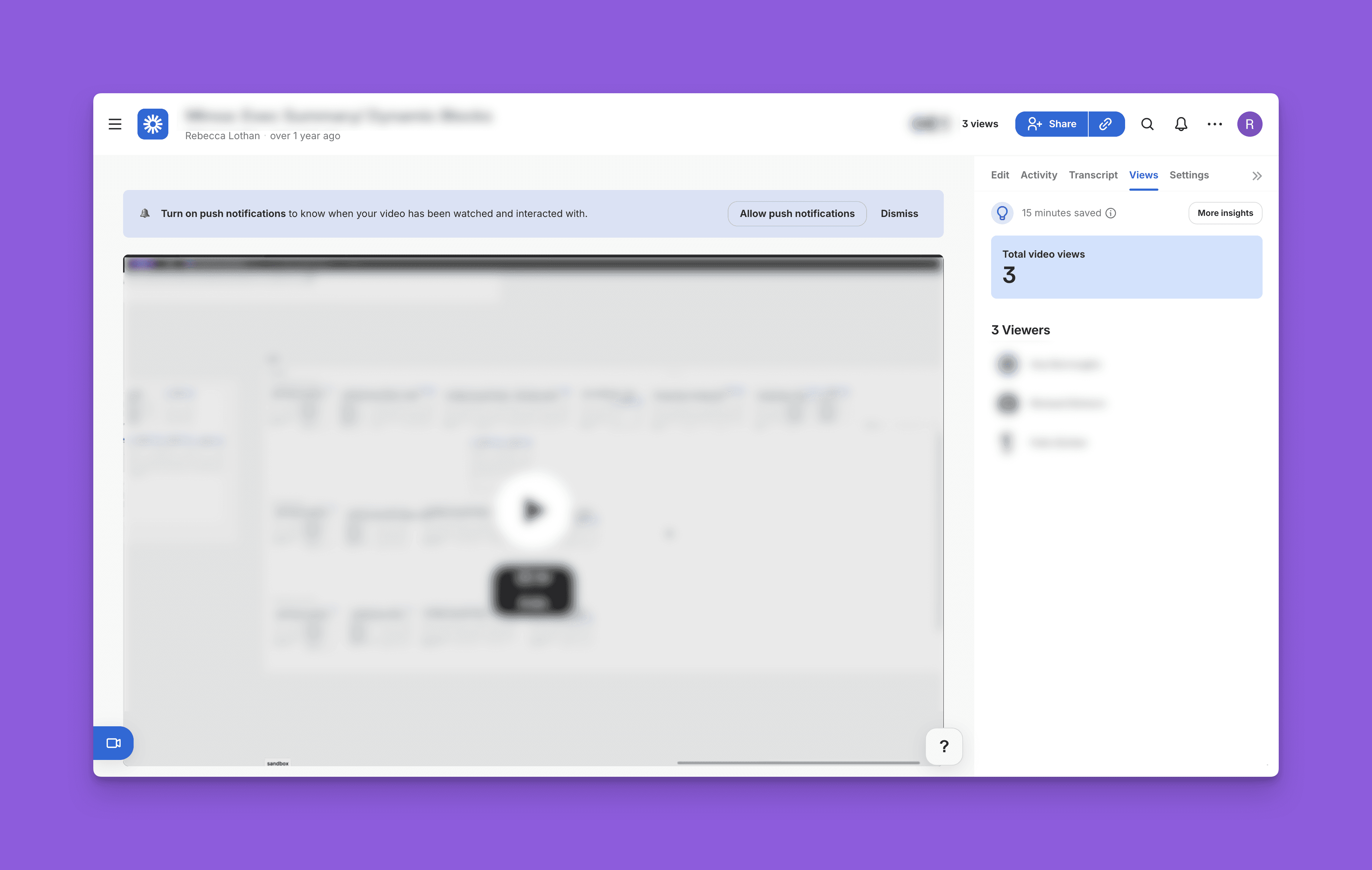
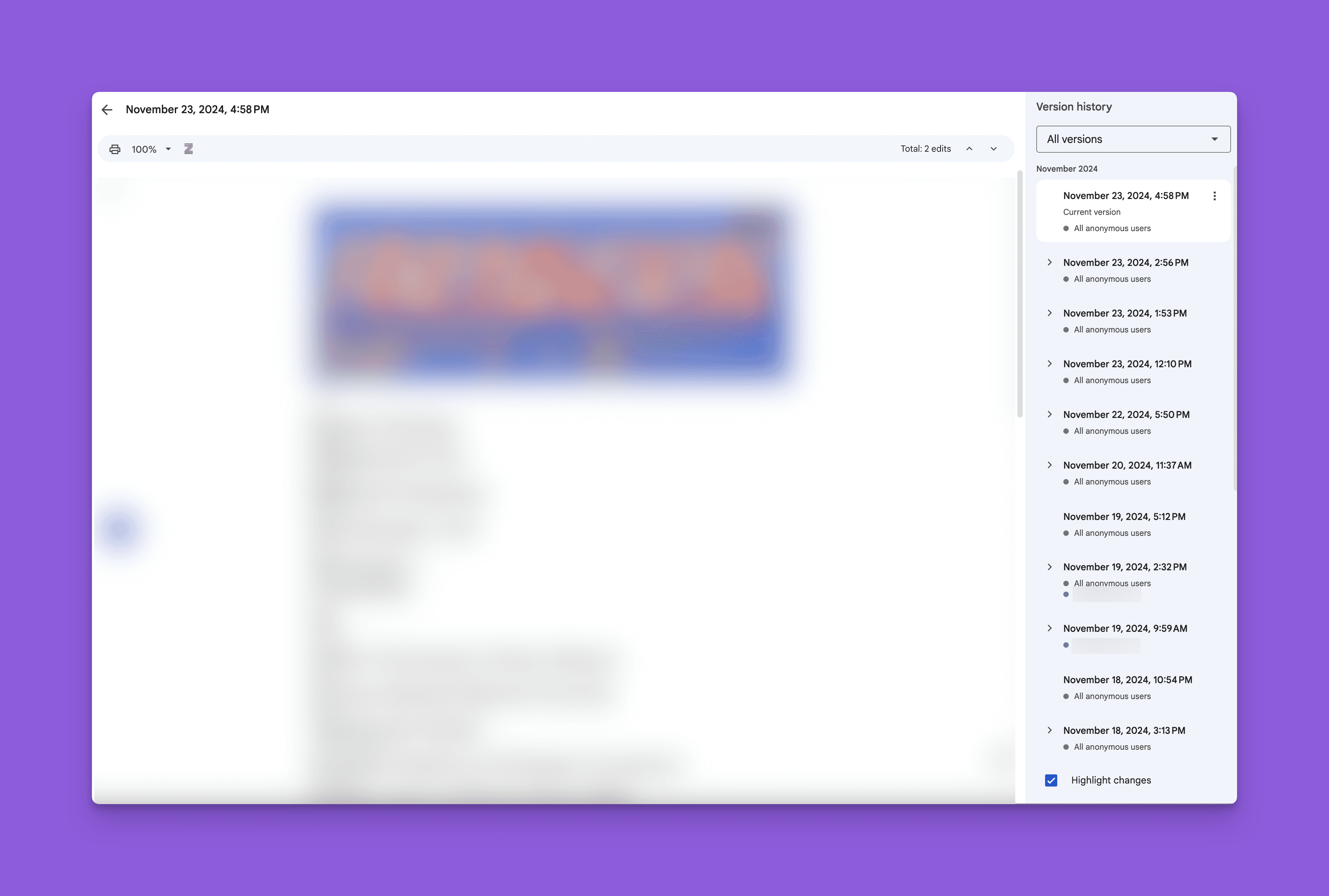
I reviewed a handful of collaborative platforms that surface viewiership insights, looking at what information is called out and how edit history is communicated. Loom and Google Docs were most influential:

Loom - Views
Google Docs - Version History
Insights

Leverage excitement around visible engagement

Leverage excitement around visible engagement

Leverage excitement around visible engagement

Chronological Timeline

Chronological Timeline

Chronological Timeline

Data displayed on large number call outs and charts

Data displayed on large number call outs and charts

Data displayed on large number call outs and charts

Solution

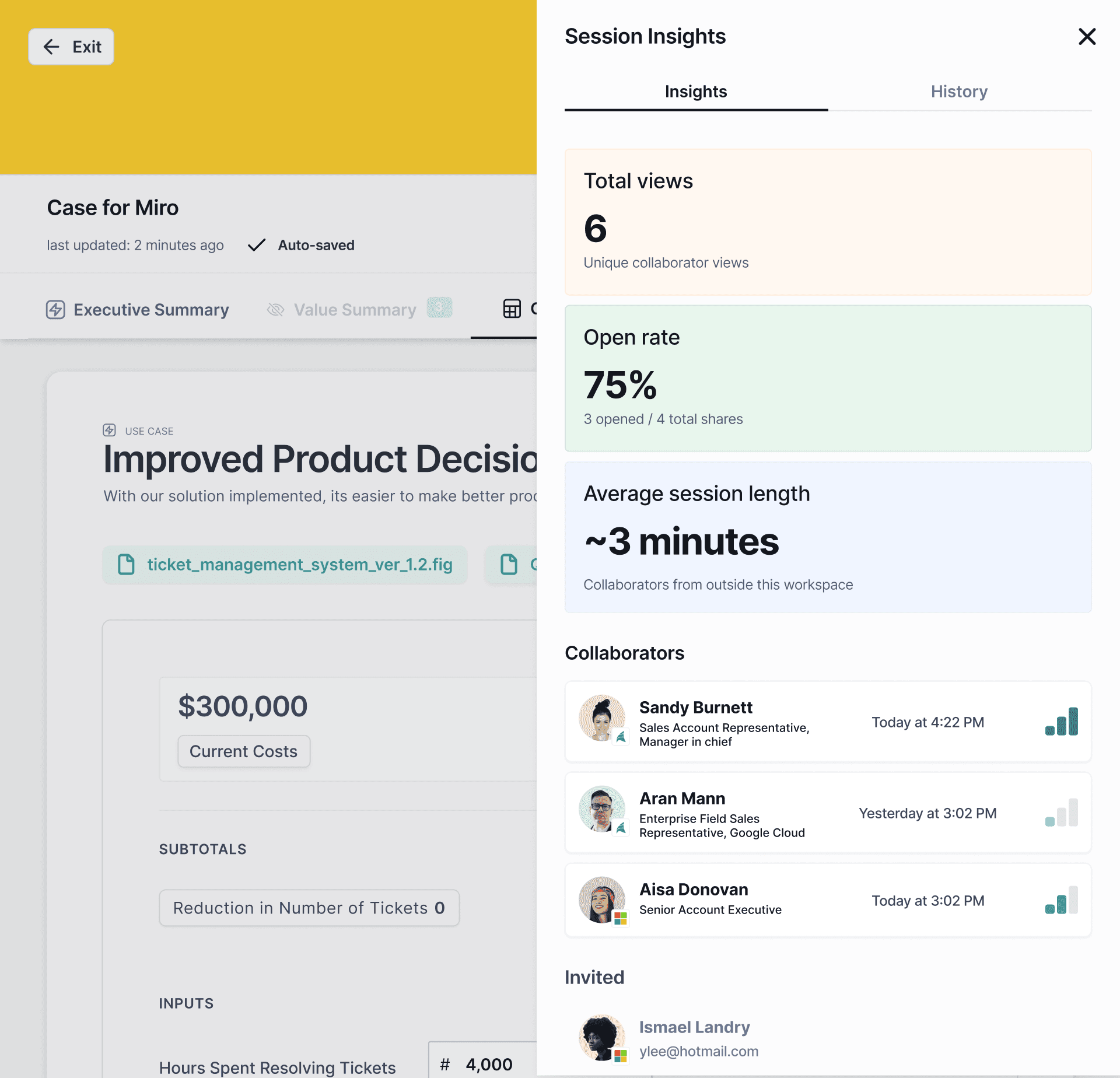
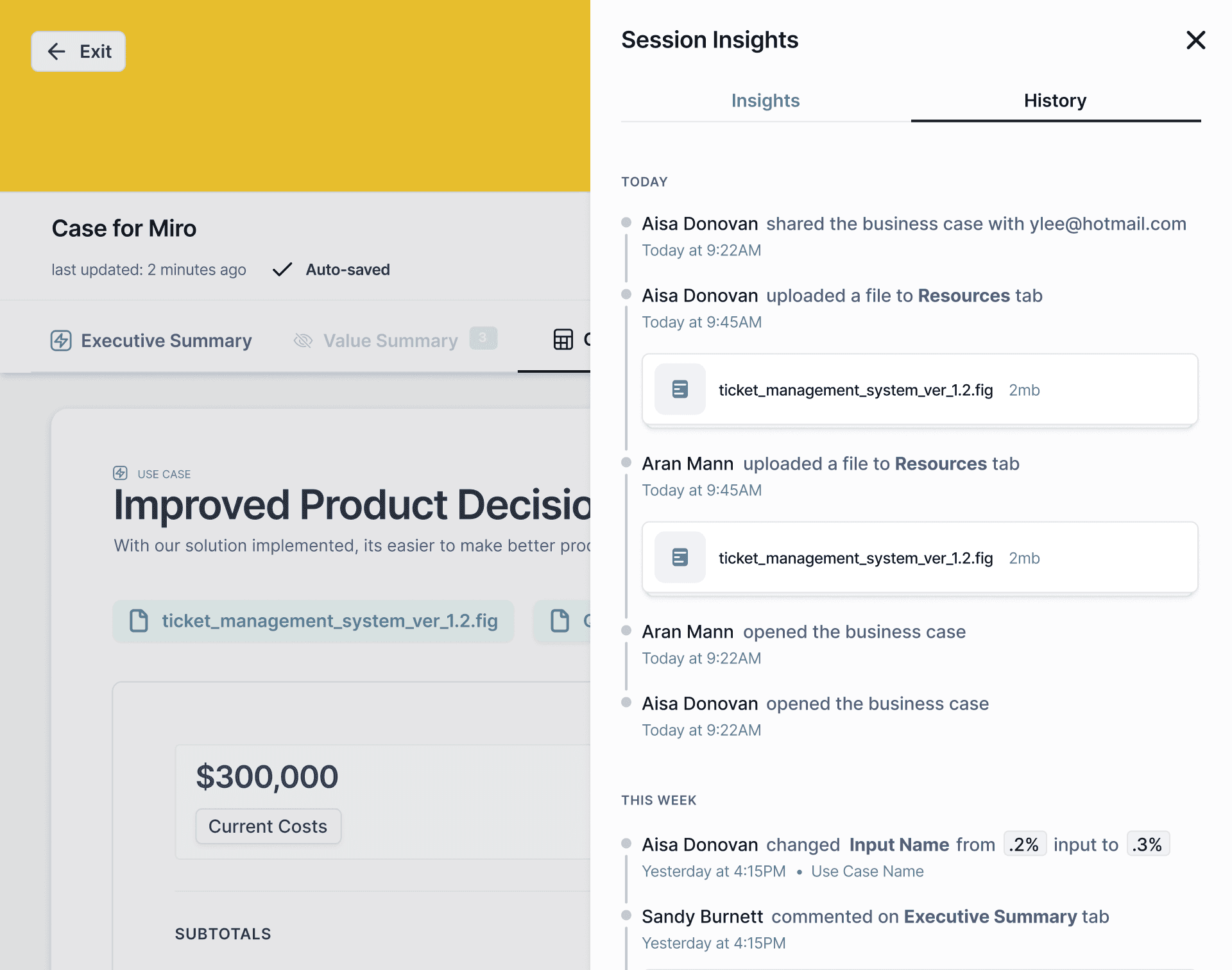
Explore user engagement with the new Session Insights tool. The overview tab provides high level insights into user interaction with the business case. Explore detailed logs of all user actions in the history tab. You can also view each user’s specific activities and a simple engagement score by clicking on the name of a user from the overview tab.

Insights Tab
2

1

1

Insight Spotlight

View engagement metrics at a glance including: Total views, Open Rate, and Average Session Length

1

Insight Spotlight

View engagement metrics at a glance including: Total views, Open Rate, and Average Session Length

1

Insight Spotlight

View engagement metrics at a glance including: Total views, Open Rate, and Average Session Length

2

Collaborators

View all active collaborators and those who have been invited (but not accepted) an invitation. See each users relative engagement score in a bar chart graphic.

2

Collaborators

View all active collaborators and those who have been invited (but not accepted) an invitation. See each users relative engagement score in a bar chart graphic.

2

Collaborators

View all active collaborators and those who have been invited (but not accepted) an invitation. See each users relative engagement score in a bar chart graphic.

History Tab
3

Activity History

Detailed log of all user activity: edits, file uploads, and comments.

3

Activity History

Detailed log of all user activity: edits, file uploads, and comments.

3

Activity History

Detailed log of all user activity: edits, file uploads, and comments.

4

Action Entries

Time stamped entries with information about who performed the action, and where. Select a user to view collaborator detail.

4

Action Entries

Time stamped entries with information about who performed the action, and where. Select a user to view collaborator detail.

4

Action Entries

Time stamped entries with information about who performed the action, and where. Select a user to view collaborator detail.

4

3

4

3

4

3

Visitor Details

6

5

6

5

6

5

5

Engagement Scorecard

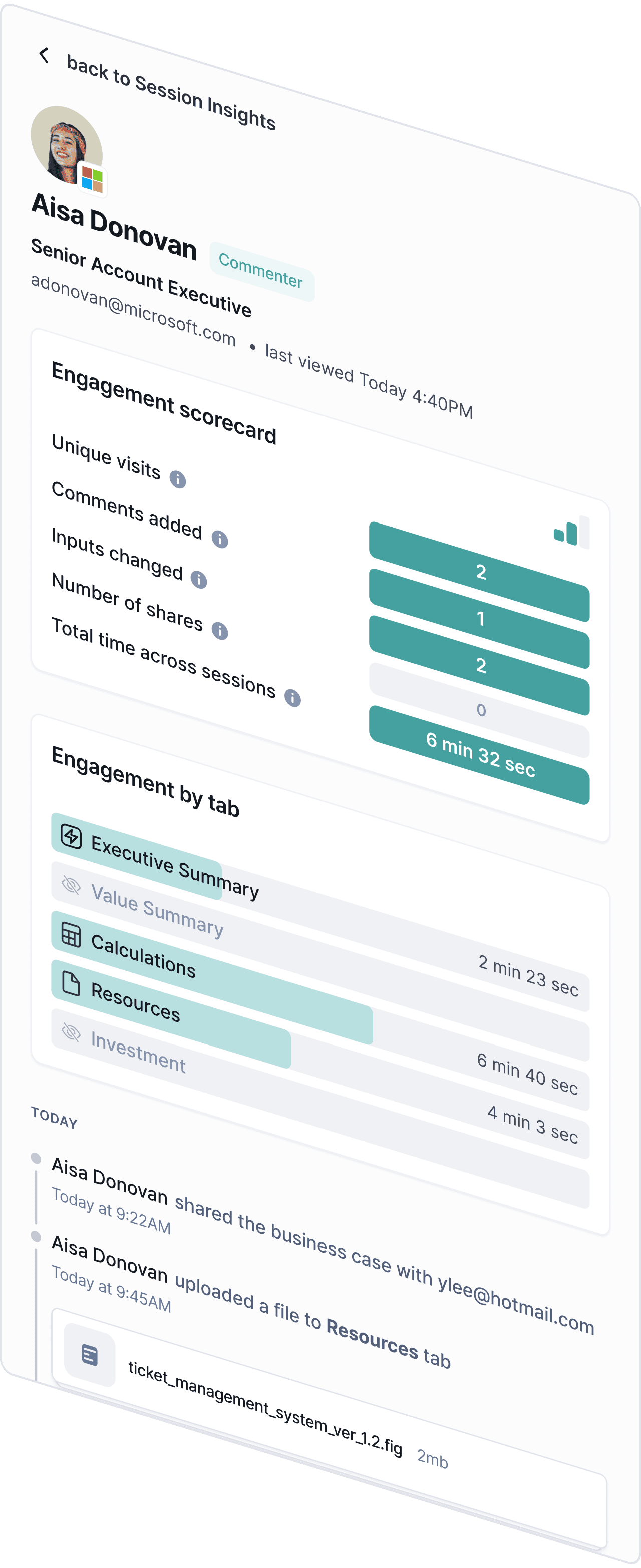
View each user’s specific activities and a simple engagement score to help users see if a deal may be in trouble and require intervention.

5

Engagement Scorecard

View each user’s specific activities and a simple engagement score to help users see if a deal may be in trouble and require intervention.

5

Engagement Scorecard

View each user’s specific activities and a simple engagement score to help users see if a deal may be in trouble and require intervention.

6

Engagement by Tab

See which parts of the business case got the most attention from your prospect, and learn what works for future business cases.

6

Engagement by Tab

See which parts of the business case got the most attention from your prospect, and learn what works for future business cases.

6

Engagement by Tab

See which parts of the business case got the most attention from your prospect, and learn what works for future business cases.

Impact

At a high level this feature had three major impacts for the business and users:

In-App Sharing Boost

Access to valuable engagement analytics made users want to share in-app. Increased visibility into user sharing behavior helped Minoa make informed product decisions moving forward.

Deal Temperature Visibility

This feature provided valuable information on deal temperature and champion engagement. Users could easily identify deals that might be in trouble, and course correct accordingly.

Learning Feedback Loop

Sales teams were able to identify high-performing content patterns and replicate success across future business cases and deals, increasing deal sizes and win rates.

Impact

At a high level this feature had three major impacts for the business and users:

In-App Sharing Boost

Access to valuable engagement analytics made users want to share in-app. Increased visibility into user sharing behavior helped Minoa make informed product decisions moving forward.

Deal Temperature Visibility

This feature provided valuable information on deal temperature and champion engagement. Users could easily identify deals that might be in trouble, and course correct accordingly.

Learning Feedback Loop

Sales teams were able to identify high-performing content patterns and replicate success across future business cases and deals, increasing deal sizes and win rates.

Impact

At a high level this feature had three major impacts for the business and users:

In-App Sharing Boost

Access to valuable engagement analytics made users want to share in-app. Increased visibility into user sharing behavior helped Minoa make informed product decisions moving forward.

Deal Temperature Visibility

This feature provided valuable information on deal temperature and champion engagement. Users could easily identify deals that might be in trouble, and course correct accordingly.

Learning Feedback Loop

Sales teams were able to identify high-performing content patterns and replicate success across future business cases and deals, increasing deal sizes and win rates.